
Material Sheet
When making source sheets, you must copy the first 3 rows of the official source sheet completely and start your data at the 4th row.
About columns, empty rows and empty cells
Missing columns are filled with empty values — the game logs a #source ill-format warning (visible in Player.log) and keeps loading. Reordered columns are re-mapped by header name automatically. Still, copy the whole official header row as-is; it avoids both paths entirely.
A row with an empty id aborts the rest of the sheet, every row after it is skipped, again with no warning. Do not use blank rows to group your data unless intentionally.
An empty cell is not an empty value — the game falls back to the default on row 3. This sheet defaults thing to chunk, decal to 2, defFloor/defBlock to 1, ramp to 6, hardness to 1, chance to 1000, weight and value to 100, quality to 1 and dice to 100.
You can change your default row 3 values to apply it to all other rows. Your data should start at the 4th row.
Sheet Columns
| Column | Type | Description |
|---|---|---|
| id | int | Unique numeric identifier for the material. If matching a vanilla entry or another mod's entry ID, the last sheet to load will override the others. Make this very unique and big enough so it doesn't overlap. |
| alias | string | Material alias, used for referencing in other sheets (e.g. Thing's defMat column). |
| name_JP | string | Display name in Japanese. |
| name | string | Display name in English. Other languages use SourceLocalization. |
| category | string | Material category. Vanilla uses gem, soil, wood, ore, fiber, rock, crystal, water, grass, skin, organic and bone. Note that metal and leather are not categories — they are values of the groups column. |
| tag | string[] | Tags for special behaviors. Use addColorMain(RRGGBBAA) and addColorAlt(RRGGBBAA) to define custom material colors. See Custom Material below. |
| thing | string | The raw-material item of this material (default chunk), created e.g. when digging virgin ground or gathering on the world map. |
| goods | string[] | Consider this unused. |
| minerals | string[] | Consider this unused. |
| decal | int | Decal/blood overlay id. See Decal |
| decay | int | Decay rate when item is made of this material. |
| grass | int | Consider this unused. |
| defFloor | int | Default SourceFloor tile ID. |
| defBlock | int | Default SourceBlock tile ID. |
| edge | int | Consider this unused. |
| ramp | int | Ramp block tile ID. |
| idSound | string | Impact sound ID. Custom sounds are placed in Sound/Material/ folder. |
| soundFoot | string | Footstep sound ID. Custom sounds are placed in Sound/Footstep/ folder. |
| hardness | int | Material hardness; affects work speed when mining/processing and several combat formulas. Also auto-added as a hardness element on import. |
| groups | string[] | Material tier group (e.g. metal, leather). |
| tier | int | Material tier in the tier group. |
| chance | int | Random chance weight within the tier group. |
| weight | int | Weight multiplier in percent applied to the item's base weight (100 = unchanged). |
| value | int | Value multiplier in percent applied to the item's price (100 = neutral). |
| quality | int | Material quality modifier. |
| atk | int | Hit multiplier in percent (100 = neutral) applied to the equipment's base hit bonus. |
| dmg | int | Damage multiplier in percent (100 = neutral) applied to the equipment's base damage bonus. |
| dv | int | DV multiplier in percent (100 = neutral) applied to the equipment's base DV. |
| pv | int | PV multiplier in percent (100 = neutral) applied to the equipment's base PV. |
| dice | int | Dice dimension modifier for damage calculations. |
| bits | string[] | Proof against fire or acid. |
| elements | elements | SourceElement bonuses when used as equipment material. |
| altName | string[] | Unique equipment name prefixes. |
| altName_JP | string[] | Unique equipment name prefixes in Japanese. |
Custom Material
A custom material without a color mapping still loads — the game auto-creates a default (gray) entry and logs it — but it will not display with your intended colors. To make your custom material display properly, define its colors in the tag column.
Color Tags
Use addColorMain(color_hex) and addColorAlt(color_hex) in the tag column of your material row to define the main and alternate colors of your material.
The color format is RRGGBBAA (8 hex digits):
- RR: Red (
00–ff) - GG: Green (
00–ff) - BB: Blue (
00–ff) - AA: Alpha/opacity (
00–ff)
Migrating From CWL
CWL specs used addCol_Main and addCol_Alt (case-sensitive), which will still function the same as before. We recommend switching to the new format.
For example:
addColorMain(ffff00ff),addColorAlt(ff0000ff)This sets the main color to yellow (fully opaque) and the alternate color to red (fully opaque).
Color Format
The color hex string is case insensitive and does not begin with # or 0x.
Decal
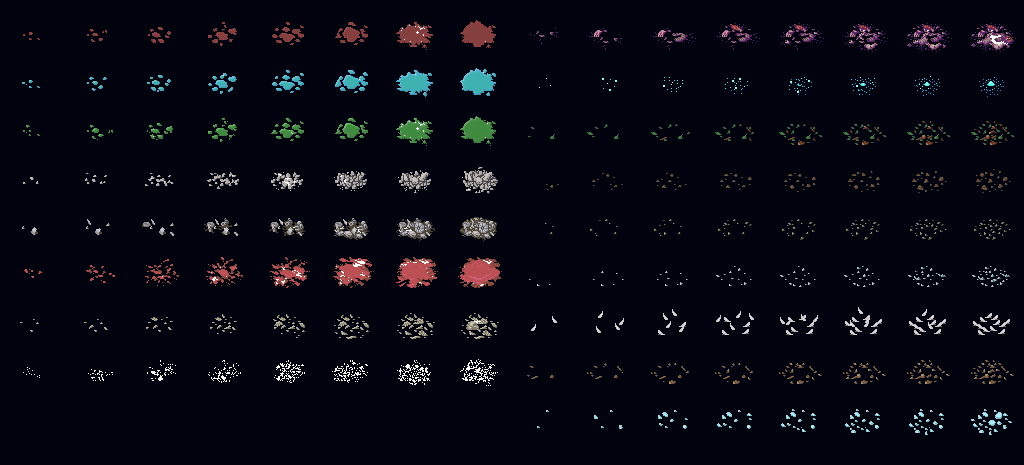
Index starts at 2 (top-left). Each row contains 2 groups of decals with separate number indices, e.g. the 1st row is 2 and 3, 2nd row is 4 and 5.